Every smart home category eventually finds its “why.” For smart bulbs it was convenience. For locks it was never carrying keys again. For presence sensors, the honest answer for most of us has been turning the hallway light on a bit faster — a real improvement, but not one that changes a life.
Aging in place is the exception. It is the one smart home use case where the payoff isn’t comfort, it’s someone staying in their own home for another five years instead of moving into assisted living. And in 2026, the hardware to do it finally exists at prices normal people pay: a ceiling-mounted radar sensor that detects a fall costs less than a mid-range smart bulb starter kit.
The catch — and there’s always a catch — is that the ecosystem around that hardware is a mess. Matter doesn’t speak this language. The most capable systems are locked behind healthcare channels. And the one genuinely revolutionary technology on the horizon, Wi-Fi sensing, has an approved standard and almost nothing shipping to consumers.
Here’s what actually works today, what it costs, and where the gaps are.
Why wearables lose (and why they still win sometimes)
The medical alert industry has spent forty years selling pendants. The technology is proven, the monitoring centers are staffed 24/7, and the Apple Watch’s fall detection has genuinely saved lives.
But the failure mode is brutally simple: people take them off. They come off in the shower — where a large share of serious falls happen. They come off at night. They come off because wearing a medical alert device is a daily reminder that you’re considered frail, and that is a psychological cost people quietly refuse to pay.
Ambient sensing solves exactly that one problem. Nothing is worn, nothing is charged, nothing is remembered. That’s the entire pitch, and it’s a good one. It is not, however, a reason to throw away a wearable that someone will actually wear. The strongest setups in 2026 layer both: ambient sensors for the rooms where wearables come off, a watch or pendant for everywhere else.
The mmWave layer: radar that sees shape, not image
Millimeter-wave radar is the technology doing the heavy lifting. It bounces high-frequency radio waves off a room and reads the reflections, which means it registers micro-movements — the rise and fall of a chest, a hand shifting — that a passive infrared sensor sails straight past. It works in total darkness, through steam, and it produces no image, which matters enormously in a bathroom or bedroom.
Aqara Presence Sensor FP2 — the accessible entry point
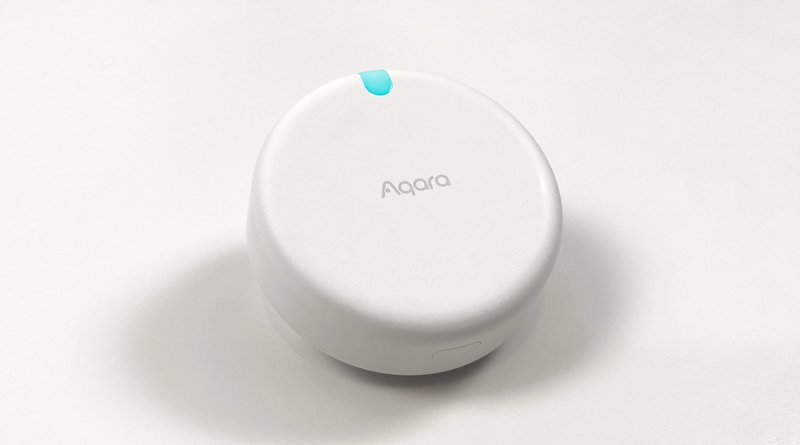
The Aqara FP2 is where most people should start, mostly because it’s the only mainstream consumer sensor with a real fall-detection mode that doesn’t come attached to a monitoring contract.
Mount it on the ceiling, switch on Fall Detection Mode in the Aqara app, and it will alert you within a second or two of detecting a fall. Aqara claims better than 98% detection accuracy. Wall-mounted, it handles up to five people simultaneously and does zone positioning, which makes it a superb automation sensor.
But note the trade-off, because it’s easy to miss: fall detection requires ceiling mounting, and ceiling mounting is what costs you the zones and multi-person tracking. You are picking one job for each sensor, not getting both from one unit.
It lists around $85, though it street-prices considerably lower and has been seen under $60 on sale. It’s wired (USB-C) and needs 2.4 GHz Wi-Fi. It works with Apple Home, Alexa, Google Home, SmartThings and Home Assistant. If you’re in Singapore, the FP2 is available locally through PFE Tech.
Now the limitations, because they’re significant and Aqara is refreshingly upfront about them:
- Fall detection coverage is a 2-metre-radius circle — not the whole room. You are protecting a specific zone: the shower, the space beside the bed, the bottom of the stairs. One sensor is not one house.
- Recommended mounting height is 2.5–2.8 m. Higher ceilings degrade it.
- It cannot reliably catch a slow slide down a wall or someone sitting down and then losing consciousness. It’s tuned for the sharp vertical drop.
- Aqara explicitly states it is not a substitute for medical equipment. Take that literally.
Aqara Presence Multi-Sensor FP300 — great sensor, no fall detection
The FP300 is Aqara’s newer, more interesting radio: $49.99, battery-powered on two CR2450 cells for up to three years on Zigbee or two on Thread, combining PIR, mmWave, light, temperature and humidity in one puck. Range is about 6 m across a 120° field of view, and with a Thread border router it joins Matter properly — Apple Home, Google Home, Alexa, SmartThings, Home Assistant, Homey.
It is a superb sensor and, for this particular job, the wrong one. The FP300 does not do fall detection. It’s a presence and environment sensor. I’m flagging it because the model numbers are close enough that people buy the cheaper newer one assuming it’s a superset, and it isn’t.
What the FP300 is excellent at is the second half of aging-in-place monitoring: the absence of expected activity. No motion in the kitchen by 10am. Bathroom occupancy that’s run past twenty minutes. Bedroom temperature drifting somewhere unsafe. Those patterns catch problems that never involve a fall at all, and honestly they may matter more. If you want the deeper technical comparison of Aqara’s radar line, we covered it in Aqara FP400 vs FP2.
Vayyar Care — the best system you probably can’t buy
Vayyar makes 4D imaging radar that is genuinely a class above the consumer sensors: a single wall-mounted unit monitors an entire room, tracks posture rather than just motion, works in darkness and steam, and needs no wearable, camera or pressure pad.
The problem is the route to market. Vayyar Care’s consumer life in the US was tied to Amazon’s Alexa Together subscription, which Amazon shut down — and the company’s centre of gravity has moved to professional channels, with partnerships like TekTone for senior-living facilities and distributors handling regional consumer availability. You can still find units listed, but expect subscription requirements, regional restrictions, and none of the smart home integration you’d get from an Aqara sensor.
If a family member is in a facility, ask whether they use Vayyar-based monitoring — it’s very good. For a DIY home install, it’s not currently a realistic pick in most countries.
Wi-Fi sensing: the one to watch, not the one to buy
The most interesting development isn’t a product. On 26 September 2025 the IEEE published 802.11bf, the amendment that makes sensing a native Wi-Fi capability. The idea: your router already floods the house with radio waves and already measures how they’re distorted. Read those distortions carefully enough and you get motion, occupancy, people counting, gesture recognition — and, in lab conditions, falls and breathing rate. No new hardware in the room. No sensor to mount. No batteries.
This isn’t vapourware. NIST has documented the standard’s path to adoption, and Origin Wireless — a major contributor to 802.11bf and the prpl Foundation’s Wi-Fi Sensing working group — reports a deployment spanning over 10 million routers hitting 92.6% motion-detection accuracy while cutting false alarms from 63.1% to 8.4%. That false-alarm number is the important one. Ambient monitoring dies the moment a family stops trusting the alerts.
So why not buy in now? Because consumer availability is thin, most shipping implementations do motion and presence rather than certified fall detection, and the capability will likely arrive as a firmware feature or ISP add-on on hardware you already own. Wait. This one is coming to you.
The alerting layer, and Matter’s blind spot
A sensor that detects a fall is useless if nobody hears about it. Your options:
Vendor app push notifications — free, instant, and entirely dependent on someone having their phone off silent. Fine as a backup, insufficient as a primary.
Alexa Emergency Assist — $5.99/month or $59/year, and worth understanding precisely. It gives hands-free “Alexa, call for help” access to an emergency response agent from any Echo, notifies your emergency contacts, and listens for acoustic events like smoke alarms and breaking glass. What it does not do is detect falls. Amazon’s own service description is clear about that. It’s an excellent response layer bolted to a sensor layer you supply.
Home Assistant — the power-user answer, and the one I’d build for a family member. Local processing, no cloud dependency, and full control over escalation logic: fall detected → announce on the nearest speaker → wait 30 seconds for a cancel → SMS the daughter → wait two minutes → call the neighbour. You cannot buy that escalation chain off a shelf at any price.
Which brings us to the structural gap. Matter still has no shipping fall-detection device type. The spec models presence as plain occupancy sensing — occupied or not — so a fall is a vendor-specific event that lives and dies inside a vendor app. Your Matter-certified FP2 will cheerfully report occupancy to Apple Home while its single most important capability never leaves Aqara’s.
The fix has a name and a draft. The Ambient Context Sensor is a proposed Matter device type that goes well beyond binary occupancy, reporting activity types — sitting, sleeping, falling — with spatial awareness of where in the room they happened. It’s exactly what this category needs. It was widely expected in Matter 1.6, and it didn’t make the cut: the CSA’s 1.6 release landed as a focused update around NFC commissioning, Joint Fabric and thermostat suggestions, with the ambient sensing work still in draft and no guarantee it ships in its current form. We broke that release down in Matter 1.6 Is Here.
So the honest 2026 status: health and safety sensing is Matter’s largest unclaimed territory, the claim has been staked, and nobody’s built on it yet. Plan your setup around vendor apps and Home Assistant, not around a standard that hasn’t arrived.
What I’d actually install
For a parent living alone, in priority order:
- One FP2 in the bathroom, ceiling-mounted over the shower and toilet approach, fall detection on. It’s the highest-risk room and the room where a wearable is guaranteed to be absent. Roughly $60–85.
- One FP2 beside the bed if stairs aren’t a factor, or at the bottom of the stairs if they are. Same money again.
- FP300 sensors in the kitchen and living room at $49.99 each — not for falls, but for the daily-rhythm automations that flag nothing happened today, which is often the earlier warning sign.
- A contact sensor on the fridge and the front door, cheap and remarkably informative about whether someone is eating and whether they’ve gone out and not returned.
- An Echo in every occupied room with Emergency Assist, as the voice-activated response layer.
- Home Assistant on a mini PC to wire the escalation logic together locally.
That’s roughly $250–350 in sensors plus whatever hub you land on. Compare it to the cost of a single month of assisted living.
Two closing cautions. First, talk to the person being monitored before installing anything. Ambient sensing is less invasive than a camera, but it is still surveillance in someone’s home, and a system installed over an objection tends to get unplugged. Second, none of this is medical equipment, none of it is a monitoring service with a human on the other end, and every vendor here says so in their own documentation. Treat it as an early-warning layer that improves the odds — not as a safety net that catches everything.
The odds are worth improving. That’s the whole point.