Why the Hue Bridge Pro Exists
If you have been running Philips Hue lights for more than a couple of years, you know the frustration. The original Hue Bridge (technically the V2, launched way back in 2015) was a marvel of simplicity — plug it in, connect to your router, and your lights just worked. But as Hue’s ecosystem ballooned to hundreds of accessories, that little white puck started showing its age. Slow response times, a hard cap of 50 lights and 12 accessories, and the occasional “light just didn’t turn on” moment became facts of life.
The Hue Bridge Pro, launched in September 2025 at $98.99, is Signify’s answer to a decade of accumulated frustrations. And after six months on the market with firmware updates steadily rolling in, we now have a much clearer picture of what the Bridge Pro gets right — and where it still falls short.
What You Get for $99
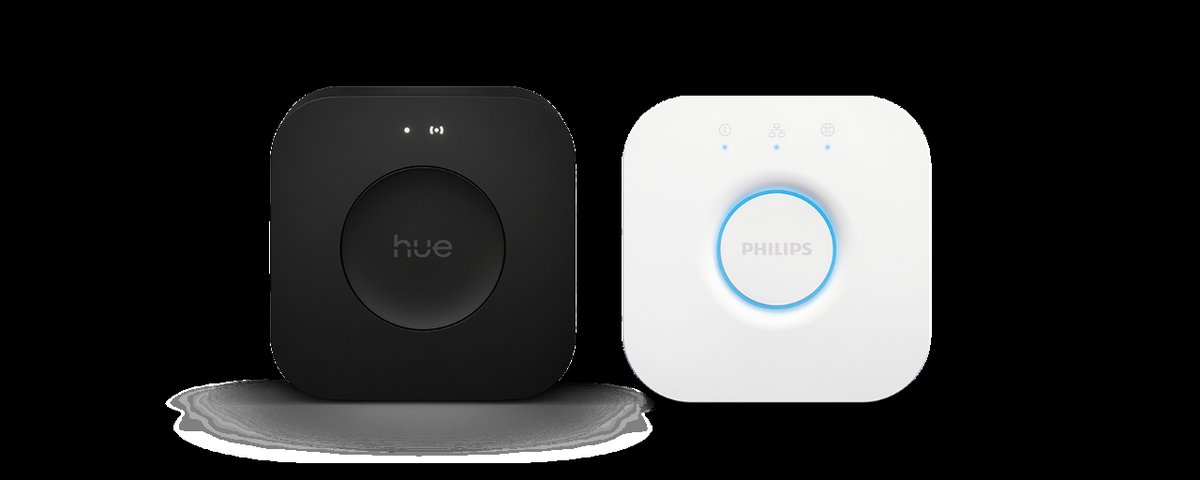
The Bridge Pro looks different from its predecessor. Gone is the glossy white flying-saucer aesthetic; in its place is a compact, matte-black square that blends into a shelf or media cabinet far more gracefully. It is a small visual change that signals a bigger shift under the hood.
Hardware Specs at a Glance
- Processor: Quad-core ARM Cortex-A35 at 1.7 GHz (a massive leap from the old bridge’s single-core chip)
- Memory: 1 GB DDR4 SDRAM (up from just 16 MB — roughly 64x more)
- Storage: 8 GB eMMC flash
- Connectivity: Wi-Fi 5 + Ethernet (100 Mbps), Zigbee 3.0, Bluetooth LE
- Capacity: 150+ lights, 50+ accessories, 500 scenes
- Price: $98.99 / €99.99
That memory jump is the headline number. The old bridge had 16 MB of RAM. The Pro has 1 GB of DDR4. In practice, this translates to dramatically faster scene switching, near-instant responses to automation triggers, and no more “did it register my tap?” moments with wall switches. Multiple reviewers — Trusted Reviews, The Ambient, and others — confirmed that dimmer switches and motion triggers that used to require a second press now work on the first tap, every time.
The processor upgrade matters too. Scenes that involve dozens of lights changing color simultaneously now execute without the staggered, popcorn-like rollout that plagued larger installations on the old bridge.
MotionAware: Turning Your Lights Into Motion Sensors
The most genuinely innovative thing about the Bridge Pro is MotionAware, a feature that turns your existing Hue lights into motion detectors without any additional hardware.
Here is how it works: your Hue bulbs communicate with each other constantly over Zigbee. When a person walks between two bulbs, their body disrupts the radio signal. The Bridge Pro’s beefier processor detects these signal fluctuations and interprets them as motion. It is essentially Wi-Fi sensing technology applied to Zigbee — clever engineering that repurposes infrastructure you already have.
Setting It Up
To create a MotionAware zone, you need three or four lights in the same room, all connected to the Bridge Pro. The lights should be spaced 1 to 7 meters (3 to 23 feet) apart, and ideally at varying heights to create a three-dimensional detection area. During setup, the Hue app asks you to leave the room for about 20 seconds while it calibrates the baseline signal patterns.
Once calibrated, you can set the zone to turn lights on when motion is detected, trigger automations, or send security alerts. Philips says about 95 percent of its existing bulbs support MotionAware, though some portable models and third-party Zigbee bulbs do not make the cut.
How Well Does It Actually Work?
For the basic use case — turning lights on when you walk into a room — MotionAware works surprisingly well. It is not as fast or precise as a dedicated Aqara Presence Sensor FP2 or even a basic PIR sensor, but it catches the big movements reliably. Walking through a hallway, entering a kitchen, coming into the living room — these all register consistently.
Where it struggles is with subtle movements. Sitting still on a couch will not keep the lights on the way a mmWave presence sensor would. PCWorld’s detailed testing described it as “magical, but imperfect” — a fair summary. And walls between lights interfere with detection, so you cannot create a zone that spans multiple rooms. It is strictly room-by-room.
The subscription catch: while basic MotionAware automation (lights turning on/off) is free, security alert notifications require a paid plan — $1 per month or $10 per year. You can also bundle it with a Hue Secure plan. It is not a dealbreaker, but it is the kind of nickel-and-diming that leaves a sour taste at the $99 price point.
Wi-Fi: Freedom From the Router
The old Hue Bridge required a wired Ethernet connection to your router. The Bridge Pro adds Wi-Fi, which means you can place it anywhere in your home with a power outlet. This is a bigger deal than it sounds — Zigbee range is finite, and being able to position the bridge centrally rather than wherever your router lives can meaningfully improve responsiveness and reliability for lights at the edges of your network.
For apartments and smaller homes, this might be a minor convenience. For larger houses where the router sits in a basement utility closet, it can genuinely transform the reliability of your Hue system.
One caveat: the Ethernet port is only 100 Mbps, which is perfectly adequate for a Zigbee controller but feels oddly outdated on a 2025 product. And there is no PoE support, so if you were hoping to run a single cable, you will still need a separate power adapter.
Matter and Thread: Where Hue Fits in 2026
The Bridge Pro supports Matter, acting as a Matter bridge that exposes your Hue devices to other Matter controllers like Apple Home, Google Home, Samsung SmartThings, and Amazon Alexa. This means your Hue lights can participate in cross-platform automations alongside non-Hue devices — a Hue motion sensor could trigger a non-Hue smart plug, for instance.
What is more interesting is Philips Hue’s new dual-protocol bulbs. The latest A19 lamps include Thread radio alongside Zigbee and Bluetooth, meaning they can connect directly to Matter platforms without a bridge at all. When first powered on, these bulbs broadcast on all three protocols simultaneously, and whichever app you use for setup picks up the relevant signal. They are available in White, White Ambiance, and White and Color Ambiance variants, with brightness ranging from 810 to 1,600 lumens.
This raises a fair question: if Hue bulbs can work without a bridge via Thread, why buy the Bridge Pro at all? The answer is features. The Hue app’s scenes, dynamic lighting effects, entertainment mode, gradient support, and now MotionAware all require the bridge. If you connect a Hue bulb directly via Thread/Matter, you get basic on/off/dimming/color control — and that is it. No Hue magic.
For Home Assistant users specifically, the native Hue integration remains the better option over Matter bridging. The official integration exposes far more functionality including dynamic scenes, entertainment groups, and room configurations. Adding Hue via Matter actually loses features compared to the native integration.
The Upgrade Experience
Migrating from the old Bridge to the Bridge Pro is remarkably painless. The Hue app walks you through transferring all your rooms, zones, scenes, automations, and accessories. The process takes about 10 minutes and preserves everything — including HomeKit pairings, which historically have been a nightmare to re-establish.
One tip: make sure your old bridge’s firmware is fully updated before starting the migration. Some users have reported hiccups when migrating from significantly outdated firmware versions. Also, Signify has been pushing regular firmware updates since launch — a March 2026 update refined MotionAware performance and fixed several stability issues.
What Could Be Better
No product review would be complete without honest criticism, and the Bridge Pro has a few legitimate complaints:
The subscription creep. MotionAware security alerts, Hue Secure camera features, and advanced notification options all push toward a monthly subscription. The base product is capable, but Signify is clearly building a recurring revenue layer on top. And Hue Secure subscriptions are per-home — if you manage lights at a vacation home or an office, you need separate plans.
Apple Home integration delays. Philips promised HomeKit Secure Video support for Hue Secure cameras by Q1 2026. That deadline has quietly slipped, and there is no updated timeline. Apple Home users have also reported ongoing connectivity issues with the Bridge Pro’s Matter integration. If you are deep in the Apple ecosystem, proceed with some caution.
The 100 Mbps Ethernet. In a world where even budget routers ship with gigabit ports, a $99 hub with Fast Ethernet feels like cost-cutting. It does not actually affect performance for Zigbee control, but it does limit some network configurations, and some users with newer managed switches have reported compatibility quirks.
No Zigbee 4.0 roadmap. Zigbee 4.0 was announced in late 2025, promising better interoperability with Thread networks. There is no word from Signify on whether the Bridge Pro will support it via firmware update.
Who Should Upgrade
Upgrade now if:
- You have more than 30 Hue lights and experience lag or missed commands
- You want MotionAware and would rather not buy separate motion sensors for every room
- You need Wi-Fi connectivity for better bridge placement
- You are building a Matter-based smart home and want Hue to participate in cross-platform automations
Wait if:
- You have a small setup (under 20 lights) that works reliably on the old bridge
- You are primarily a Home Assistant user with solid Zigbee coverage via a separate coordinator
- You are holding out for Apple HomeKit Secure Video integration before investing further in the Hue camera ecosystem
Skip entirely if:
- You are exploring smart lighting for the first time — consider whether Hue’s premium pricing is right for you versus alternatives like IKEA’s new Matter-over-Thread lineup (though those have their own issues right now) or Govee’s budget-friendly options
The Verdict
The Philips Hue Bridge Pro is the upgrade that Hue’s most loyal users have been waiting a decade for. The raw performance improvement alone — faster response times, triple the capacity, and rock-solid reliability — justifies the $98.99 asking price for anyone with a medium-to-large Hue installation. MotionAware is genuinely clever, even if its most useful features are gated behind a subscription. And Matter/Thread support positions the Bridge Pro well for the multi-protocol future that the smart home industry keeps promising.
It is not revolutionary. It is the kind of boring, essential infrastructure upgrade that makes everything else in your smart home work better. And sometimes, that is exactly what you need.