Voice assistants get all the headlines, but ask anyone who has actually lived with a smart home for a few years and they’ll tell you the same thing: the device they touch most isn’t a speaker or an app. It’s a button. A physical, tactile, no-thinking-required button stuck next to the bed, by the front door, or on the arm of the sofa — one press, lights off, done. No wake word, no “sorry, I didn’t catch that,” no fishing your phone out of your pocket.
In 2026 the humble smart button has quietly become one of the most interesting corners of the smart home. The hardware got better, the dials got smoother, and — finally — a few of these things are starting to speak Matter. Sort of. We’ll get to that asterisk, because it’s a big one.
I’ve spent the last several weeks rotating Flic, Aqara, Philips Hue, Lutron, and SwitchBot controllers through my house. Here’s what’s actually worth your money, what protocol headaches to expect, and why “Matter button” is still mostly a marketing fantasy.
Why a button beats a voice command (most of the time)
Let’s start with the case for buying one at all. Voice control is genuinely great for hands-busy moments and for queries (“is the garage door open?”). But for the dozen tiny actions you repeat every single day — kill the lights, dim for movie night, trigger your “leaving home” routine — a button is faster, more reliable, and works when the internet is down or the baby is asleep and you don’t want to talk.
The other underrated win is household buy-in. Your partner, your kids, your guests, your visiting parents — none of them have your automations memorized, and none of them want to learn the wake word for the bedroom scene. A labeled button on the wall is universally legible. It’s the difference between a smart home you love and a smart home your family quietly resents.
So the question isn’t really whether you want one. It’s which ecosystem you’re buying into, and how badly that ecosystem locks you in.
The Matter asterisk nobody puts on the box
Here’s the thing the marketing copy won’t tell you plainly. Matter, the cross-platform standard everyone keeps promising will unify the smart home, does technically define a “Generic Switch” device type for buttons and dials. In theory, a Matter button could press into Apple Home, Google Home, Alexa, and SmartThings with zero vendor lock-in.
In practice, in mid-2026, almost no standalone button ships as a native, direct-to-Matter controller. Every major option on this list reaches your smart home platform through a vendor hub that bridges it — an Aqara hub, a Hue Bridge, a Flic Hub. That bridge is where the Matter (or HomeKit, or Alexa) connection actually happens, not in the button itself.
That matters for two reasons. First, you’re still buying into a hub ecosystem, Matter logo or not. Second, bridged controllers are second-class citizens on some platforms: Amazon Alexa and Samsung SmartThings, for example, don’t fully support the Matter “Bridge” device type, so a button bridged through an Aqara hub may simply not appear there even though it works flawlessly in Apple Home. If you want the gory details of how hub bridging actually behaves across platforms, our Thread and Matter coverage digs into the same plumbing on the wired-switch side.
Keep that asterisk in your head as we go. “Works with Matter” on a button box almost always means “works with Matter if you also own our hub.”
Aqara: the budget king (if you’re already in the ecosystem)
If you own an Aqara hub — and a huge number of smart home owners do, often without realizing the little camera or sensor they bought is a hub — Aqara’s controllers are the easiest money you’ll spend all year.
The Aqara Wireless Mini Switch is the gateway drug. It’s roughly $20, the size of a large coin, sticks anywhere with the included adhesive, and gives you three distinct actions: single press, double press, and long press. Pair it to an Aqara hub over Zigbee 3.0 and each of those three gestures can fire a different scene or automation. I have one velcroed to my nightstand running “all bedroom lights off” on a single press and “whole-house goodnight” on a double. Two years in, still on the original battery.
Step up to the Aqara Cube T1 Pro at $22.99 and you get something genuinely fun: a six-sided cube with dice-like pips that controls a different scene depending on which face is up, plus rotate, flip, shake, and tap-and-push gestures. It sounds gimmicky and it half is, but for a kid’s room or a media setup (“rotate to dim”) it’s a delight, and the tactile feedback is better than any flat button.
The catch is the one we already named: everything Aqara is Zigbee and requires an Aqara hub, which then bridges the buttons to Apple Home, Google, or Alexa via Matter or HomeKit. Inside Apple Home and the Aqara app, it’s rock solid. Outside it, your mileage varies by platform. If you’re shopping the broader Aqara range, the HomeSmart catalog carries the wireless remotes, the cube, and the wall-mounted scene panels in one place.
Buy Aqara if: you already own (or are happy to add) an Aqara hub, you live mostly in Apple Home or Google Home, and you want the lowest cost-per-button of anything here.
Philips Hue Tap Dial: the best lighting controller, full stop
If your smart home is, at its heart, a lighting setup, the Philips Hue Tap Dial Switch is the one to beat. At $49 (and frequently discounted to around $40), it pairs four physical buttons with a beautifully damped rotating dial. The dial does brightness; the four buttons cycle scenes. It snaps onto a magnetic wall plate so it doubles as a removable remote you can carry to the couch.
Nothing else here feels as nice to use for lights specifically. The dial has just enough resistance, the scene-cycling is instant because it’s all happening locally over Zigbee through your Hue Bridge, and the 2026 “Wall” version adds a larger, more switch-like footprint for people replacing a dumb wall switch. Philips also still sells the cheaper Hue Smart Button (around $25) if you only need a single on/off/dim puck.
The honesty check: the Tap Dial is at its absolute best controlling Hue lights through the Hue Bridge. Yes, the Hue Bridge now exposes your setup to Matter, and yes you can bend the Tap Dial toward non-Hue gear, but its richest multi-action behavior lives in the Hue app. If you’ve already committed to Hue bulbs — and if you have, you’ve read our Hue Bridge Pro review and our 2026 smart bulb showdown — this is a no-brainer add-on. If you haven’t, buying into Hue just for the dial is overkill.
Buy Hue Tap Dial if: you run Hue bulbs and want the nicest dedicated lighting controller on the market. Don’t buy it as a generic whole-home button — that’s not what it’s for.
Flic Twist and Flic buttons: the platform-agnostic pick
This is the one I’d hand someone who refuses to be locked into anybody’s walled garden. Flic has spent a decade building buttons that integrate sideways into everything — Apple HomeKit, Alexa, Google, SmartThings, Home Assistant, Sonos, IFTTT, raw HTTP web requests — and through the Flic Hub, into Matter as well.
The classic Flic Button is $35 (cheaper in multi-packs), rated for around three years of battery, and gives you the familiar single/double/long-press trio. It’s the most genuinely universal button you can buy.
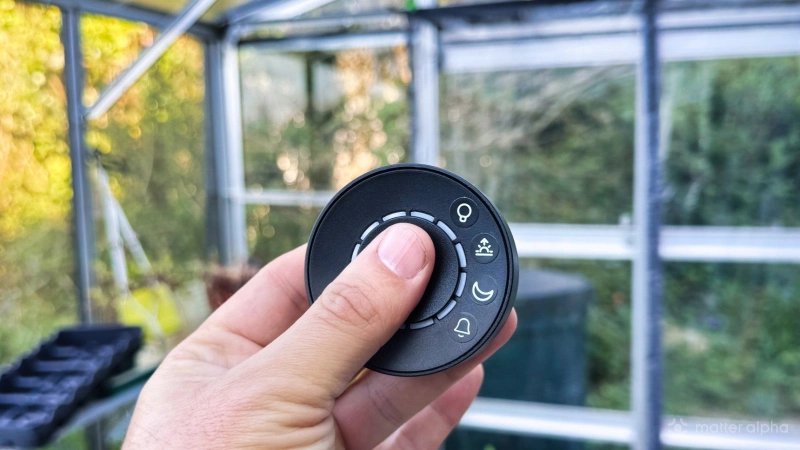
The 2026 star, though, is the Flic Twist at $80. It crams a clickable button, a rotating dial, and twelve selectable modes into one palm-sized puck, supporting up to 24 triggers and 12 analog controls. One Twist can dim your lights, skip a track, set a thermostat, and arm an alarm depending on which mode it’s twisted into. It’s the closest thing to a universal remote for your whole house that doesn’t involve a screen.
The cost — literally — is the Flic Hub, sold separately. The Twist won’t do anything without one, and the full-fat Hub LR runs about $90 (there’s a cheaper Hub Mini). So your real entry price is button-plus-hub, which makes Flic the priciest way in. But it’s also the only option here where the button is the product and the hub is genuinely platform-neutral, rather than the hub being a gateway designed to sell you more of the same brand’s gear.
Buy Flic if: you run a mixed-brand or Home Assistant setup, you hate lock-in, and you want one controller (the Twist) that can do everything. Just budget for the hub.
Lutron Aurora and SwitchBot: two clever specialists
Two more worth knowing about, because they solve specific problems the others don’t.
The Lutron Aurora ($49.95) is a brilliant bit of design for one exact scenario: you have smart bulbs, and you’re sick of people flipping the dumb wall switch and cutting power to them. The Aurora is a dimmer knob that physically mounts over your existing toggle switch, locking it permanently on, and gives you a satisfying rotary dimmer in its place. It pairs over Zigbee directly to a Hue Bridge. It only controls lights, and really only Hue, but for the “stop turning my smart bulbs into dumb bulbs” problem it’s unbeatable.
The SwitchBot Hub 3 ($119.99) is the odd one out because it isn’t a scatter-anywhere button at all — it’s a full smart home hub with a chunky physical knob and buttons built into its face, and it’s Matter-enabled. Think of it as a wall-mounted command center rather than a sticker-it-anywhere remote. If you’re already in SwitchBot’s world of curtains, locks, and meters, the knob is a lovely tactile front end for the whole system. As a standalone button, though, it’s expensive and stays put.
So which button should you actually buy?
Strip away the ecosystem politics and it comes down to a few clean recommendations:
- Already have an Aqara hub, or any Apple/Google home and a tight budget? The $20 Aqara Wireless Mini Switch is the highest-value button here, and the Cube T1 Pro is the most fun. Start there.
- Live and die by Philips Hue lighting? The Tap Dial Switch is the best dedicated lighting controller money can buy. Add the cheaper Hue Smart Button for single-action spots, or the Lutron Aurora to tame a problem wall switch.
- Refuse to be locked in, or run Home Assistant? Flic, every time. The $35 button for simple jobs, the $80 Twist when you want one controller to rule them all — just remember the Flic Hub is part of the price.
- Deep in SwitchBot already? The Hub 3’s knob is a genuinely nice physical anchor for the system, but buy it as a hub, not as a button.
And the meta-lesson, the one that’ll save you a return: buy for the hub you already own, not for the Matter logo on the box. In 2026 a smart button is only as good as the bridge it lives behind. Match the controller to your existing ecosystem and any of these will feel like magic. Mismatch it — chase a “Matter” badge into a platform that won’t render the bridge — and even the nicest dial becomes a $50 paperweight. The standard will get there. It isn’t quite there yet.