On August 18, 2026, a server-side failure at Google left Nest Hubs, Nest Minis and third-party Assistant displays stuck on loading screens for roughly twelve hours. Nothing was broken in anyone’s house. The power was on, the Wi-Fi was fine, and the hardware was inert anyway.
That outage is worth remembering, because it’s the easy failure mode. A cloud outage takes away your voice assistant and your remote access. A power outage takes away everything — including the network that the cloud was talking to. And most people who have spent four figures on smart home gear have spent exactly zero dollars making any of it survive a thunderstorm.
Here’s the thing: the fix is cheaper and smaller than you’d guess. You don’t need a generator or a whole-home battery. For most homes, the difference between “the smart home died” and “the smart home shrugged” is about $140 of hardware and knowing which three devices to plug into it.
Two different outages, two different fixes
Before buying anything, separate the two failure types, because they need different hardware.
Internet outage, power fine. Your ISP drops, a fibre cut happens, or the cloud service itself falls over. Local control survives if your platform does local control. Apple Home has processed automations locally through a HomePod or Apple TV for years. Alexa can run Matter devices locally on supported Echo hardware. Google pushed local Matter execution out through its Home Runtime architecture, though as August proved, plenty still round-trips through Google’s servers. Home Assistant, unsurprisingly, doesn’t care at all.
Power outage. Now the router, the modem, the hub, the mesh nodes, the cameras and every mains-powered bulb go dark simultaneously. Local control is irrelevant when there’s nothing left running to do the controlling.
The second one is the one worth engineering around, and it’s the one almost nobody plans for.
The failure chain: what dies, and in what order
Second zero: the network
Your modem and router are the single point of failure for everything. Combined, they typically draw 10–25 W each — which is the good news, because that’s a trivially small load to keep alive on battery.
Right behind them: your hub. A SmartThings hub, an Aqara hub, a Hubitat, a Homey Pro, a Home Assistant Green or the mini PC running HA in your cupboard. None of the mainstream hubs ship with a meaningful internal battery. Homey Pro owners have asked for years; the answer is still “use an external UPS.”
Second zero, also: your Thread and Zigbee mesh
This is the part people miss, and it’s the reason a half-measure doesn’t work.
In both Zigbee and Thread, the mains-powered devices are the routers. Your smart bulbs, smart plugs, in-wall switches and mains-powered sensors are what relay traffic across the house. Battery-powered devices — door sensors, buttons, leak sensors, most motion sensors — are end devices that talk through those routers.
So when the grid drops, your mesh doesn’t degrade. It collapses. The hub on your UPS is alive and reachable, and it’s talking to nothing, because every relay node between it and the battery-powered door sensor in the garage just lost power. The same physics that makes Z-Wave Long Range interesting for outbuildings — direct-to-hub, no repeaters — is what makes a mesh brittle in a blackout.
Practical consequence: don’t expect your sensor network to keep reporting. Expect the hub, the network and whatever you deliberately backed up to keep running. Plan automations accordingly.
What actually keeps working on its own
Some things are fine, and it’s worth knowing which so you don’t waste battery on them:
- Smart locks. They run on their own AA or rechargeable packs and will keep working from the keypad or physically for months. Your remote control of them dies; the lock doesn’t.
- Battery cameras and doorbells. They keep recording. They just have nowhere to send the footage once the router is down.
- Alarm base stations. These are the one category that took backup seriously. SimpliSafe’s Base Station carries an internal rechargeable pack rated for up to 24 hours, falling back to cellular with a monitoring plan — though during an outage you’re restricted to arming and disarming from the keypad to conserve power. Ring’s Alarm Pro has a small internal battery that keeps alarm functions only, and sells Power Packs that each add up to eight hours, stackable up to three. eufy’s HomeBase Professional S1 is rated for 24 hours built in; eufy’s own support line is that there’s no backup battery option for the older HomeBase 3.
If you already own one of these, you have alarm coverage. You do not have smart home coverage. See the 2026 DIY security comparison for how the platforms differ on this.
Tier 1: the $140 fix that covers most of it
Buy one line-interactive UPS. Plug in the modem, the router and the hub. That’s it — that’s the whole project, and it covers the overwhelming majority of real-world outages, which are minutes, not days.
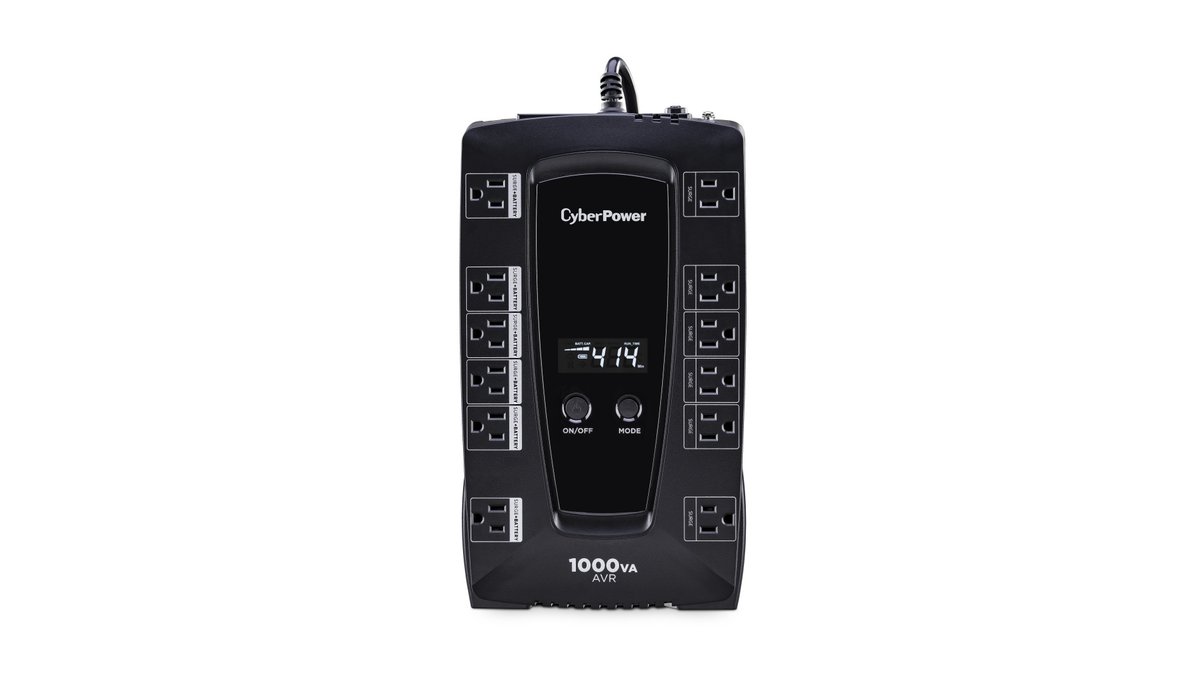
The CyberPower LE1000DG is the obvious default at $139.99 MSRP: 1000 VA / 530 W, line-interactive with AVR, 4 ms typical transfer time, and 12 outlets of which six are battery-backed and six are surge-only. That outlet split matters more than the headline VA number — it’s what stops you from accidentally putting a lamp on the battery side.
At a modem-plus-router load of around 50 W, a unit in this class runs well over an hour and frequently a few hours. Add a hub and a mesh node and you’re still comfortably in “rides out a typical storm outage” territory.
The compromise is the waveform. The LE1000DG outputs a simulated sine wave, which is fine for switch-mode power supplies — routers, modems, hubs, the wall warts on basically all smart home gear. If you’re also backing up a NAS, a home server running Home Assistant, or anything with active PFC, step up to true sine. The CyberPower CP1500PFCLCD is the standard answer at $274.95 MSRP for 1500 VA / 1000 W, pure sine output, USB communications and a three-year warranty that includes the battery. APC’s BR1500MS2 is the equivalent pure-sine option in the same class if you prefer that ecosystem.
One sizing note that trips people up: UPS units are rated in both VA and watts, and the watt figure is the one that constrains you. A “1000 VA” unit delivering 530 W is normal, not a typo.
Tier 2: portable power stations, if you want hours instead of minutes
A modern LiFePO4 power station with UPS passthrough does the same job with roughly ten times the runtime, plus it’s useful for camping. The catch is that switchover time and inverter quality vary, so read the spec rather than the marketing.
The EcoFlow River 3 Plus is the one I’d point most people at: 286 Wh, 600 W AC output (1200 W surge via X-Boost), under 10 ms UPS switchover, LiFePO4 rated at 3,000 cycles to 80 %, 10.4 lb, and expandable to 858 Wh with an extra battery. It lists at $299 on EcoFlow’s US store and is frequently discounted to around $200.
Anker’s Solix C300 is the close competitor at 288 Wh and 300 W AC with a published 10 ms switchover and a five-year warranty — noticeably less inverter headroom, but a better USB-C layout and a smaller footprint. Be aware it’s regularly out of stock on Anker’s own store, so availability is inconsistent.
At a 30 W network-and-hub load, either of these keeps things alive for the better part of a day. That’s a genuinely different class of resilience from a $140 UPS, for roughly double the money.
There’s also a category of cheap DC mini-UPS units — 12 V/9 V/5 V outputs, lithium packs, sized specifically for routers and modems. They work, they’re compact, and the runtimes are real. But the market is overwhelmingly no-name brands with no safety certification you’d recognise and no warranty worth the name. If you go this route, treat the cell chemistry claims sceptically and don’t put it somewhere a thermal event would be exciting.
Put the hub on PoE and stop thinking about it
Here’s the tidiest version of this whole exercise, and it’s underused: if your hub supports Power over Ethernet, back up the switch and the hub comes along for free.
The Aqara Hub M3 does this — it’s a Matter controller, Thread border router, Zigbee coordinator and IR blaster in one box, with PoE as a power option and 8 GB of local storage for automations that run without the cloud. Wire it to a PoE switch, put the switch and your router on one UPS, and you’ve backed up the network and the hub with a single outlet. (Regional availability varies; in Singapore it’s stocked through HomeSmart.)
The same trick applies to cameras. PoE cameras plus a PoE switch on a UPS means your local NVR setup keeps recording through an outage — a meaningful advantage over battery cameras that keep recording but can’t upload anywhere. If you’re already running a separate IoT network, this folds neatly into that segmentation work.
The other half: your internet is probably also down
Power restored but the ISP still out is a common tail to any storm. And if you kept the router alive on battery, the router is now faithfully serving you a dead connection.
The cleanest 2026 answer is Amazon’s eero Signal, which launched February 11, 2026 at $99.99 for the 4G LTE version, with a 5G model at $199.99 due later this year. It’s a dongle with a built-in multi-carrier eSIM that plugs into any USB-C-powered eero running Wi-Fi 6 or higher, detects an outage and fails over automatically. The cost you need to actually read: it requires a subscription — eero Plus at $99.99/year gets you 10 GB of backup data, and eero Plus 100 at $199.99/year gets you 100 GB.
Ten gigabytes a year is enough for automations, notifications and a bit of remote checking. It is not enough for camera uploads, so set expectations accordingly.
If you’re not on eero, the alternatives are a router with a USB or WAN failover port plus a cheap LTE modem, or a security system with its own cellular path — Ring Alarm Pro includes 3 GB of cellular data per month on a compatible subscription, and SimpliSafe falls back to cellular on a monitored plan. That covers the alarm; it doesn’t cover the rest of the house.
Monitor the UPS, or you’ll discover it’s dead when you need it
UPS batteries are consumables. They’re typically good for three to five years and they fail silently, so a unit you bought in 2021 and never looked at is quite possibly a very heavy power strip today.
If you run Home Assistant, the fix is free. The NUT integration talks to a Network UPS Tools server over USB and exposes battery charge, load, input voltage and estimated runtime as sensors. From there you get the three things worth having:
- A notification the moment you switch to battery — which, if you also have cellular failover, actually reaches your phone.
- A graceful shutdown automation when the battery drops below a threshold, so your HA database doesn’t get corrupted by an abrupt cut.
- A battery health trend you can eyeball once a year.
This is where a pure-sine UPS with proper USB communications earns its premium over the cheap unit — the CP1500PFCLCD’s USB data port is what makes any of this possible. If you’d rather keep your voice pipeline local too, Home Assistant Voice PE pairs well with this setup for a stack that genuinely doesn’t need the internet.
The Matter gap
You’d think the obvious thing — your smart home knowing it’s running on battery — would be a solved problem by now. It isn’t.
Matter 1.4 was the big energy release: it added device types for solar inverters and panel arrays, home battery storage systems including grid-discharging setups, heat pumps, water heaters and EV chargers. Matter 1.5 went further still, adding cameras, a unified closures model, soil sensors, and energy features covering electricity tariffs and grid carbon data. And 1.6 cleaned up onboarding and multi-admin. It is, at this point, a genuinely serious energy management spec.
There is still no UPS device type. Your $275 CyberPower with its USB port and its perfectly good battery telemetry cannot present itself to Apple Home, Google Home or Alexa as anything at all. The one piece of hardware whose entire job is knowing about power failures is invisible to the standard that just learned to talk about power.
So the outage-aware automations — dim the lights, kill the high-draw stuff, push a notification, shut down the server — remain Home Assistant territory, exactly as they were in 2020. If you’re tracking household energy more broadly, you’ve already run into the same wall: Matter still can’t see most of what generates or stores your electricity at home, let alone what protects it.
What I’d actually buy
If you do one thing ($140): a CyberPower LE1000DG. Modem, router and hub on the battery-backed outlets. Done in ten minutes, covers the outages you’ll actually have.
If you do two things (+$100): add cellular failover. eero Signal if you’re on eero; an LTE failover modem if you’re not. Power without internet is half a smart home.
If you’re running a server (~$275): skip straight to the CP1500PFCLCD or an APC pure-sine equivalent, wire up NUT, and get graceful shutdown plus notifications.
If you want a full day of runtime ($200–300): an EcoFlow River 3 Plus or Anker Solix C300 on passthrough, with the same three devices plugged in.
If you’re buying a hub anyway: get one with PoE and back up the switch instead of the hub.
None of this is exciting hardware. But the gap between a smart home that goes dark in a storm and one that quietly keeps the lights, locks and cameras working is one box, three plugs and an afternoon — and it’s the single highest-return purchase in a smart home that’s otherwise made entirely of things that assume the power stays on.